Dell GX 270 Windows XP Repair

I am happy this afternoon before going home, My officemate’s computer is now working and in good shape after battling with Trojans, worms, viruses name it and her computer have it.

So it a Dell GX 270, pretty old isn’t it? Yeah but still good for home use. She ask my help to save her files in her infected computer. It has a funny screen saver saying that “its infected by some virus” that you need to download this and that, and it didn’t allow me to install and uninstall anything form it.

Considering limited resources like extra computer to plug its HDD I managed to install Malwarebytes (my favorite anti-malware). Immediately it removed the funny screensaver. So I’ve download and tried to install Avast (my favorite antivirus) to no avail. It says that I don’t have permission though I am using admin account. I tried Avira and to my surprise it was successful but found nothing (funny though) so I made a “Windows Repair” because USB ports are also not working. After the repair its back to ports are back to normal so I made my back of her precious files (pictures, music, videos – yeah it’s important to her, very!)

After restoration I though everything is OK but still didn’t allow me to install Avast. To my worry that there are still malicious program running behind then I made a clean install. With it I have peace of mind.

Windows device driver is no problem because dell has good driver support. Here is the specs >> GX 270 Specs

Windows 7 and Broken Video Card

Last week my friend let me borrowed his Windows 7 Ultimate. So I was excited to go home to install and see if my system will have a good future with it.

Here is my basic configuration:

Processor: AMD Sempron

Mobo: ECS NU400 (Nvidia chipset)

RAM: 1.5 GB DDR2

HDD: 80GB

Video card: Nvidia 7300 GT DDR-2

I am a Computer System Engineer that reads news and press releases about new things in the industry so I hear lots of good new about it. You may agree with me that it’s a different feeling when you’re really holding it and not just reading it. In short I liked it. That was my first day with Windows 7. Installation was fast and easy.

Second day, when I came back from the office I was my daughter watching her favorite movies in Windows 7 computer, she complained that there is no sounds. I found out that Windows 7 did not find driver for it. It’s a build-it sound device “Realtek”. So I search the web to see if I can get driver for it. Unfortunately I did not find anything.

Third day, while I was checking some of its advance configuration when I heard an small “plik” sounds coming from my CPU box. I actually did not mind it coz my computer was normal. But after few minutes my PC restarted and will not open and started checking I then found out that my video card is broken. Check my video card below.


4 exploded capacitors.

My graphics resolution is on its “recommended” setting.

Do you think Windows 7 broke my video card???

I was using Windows 7 default Windows Driver for this when this thing happened.

Computer turns itself off after 2 seconds. Why?

I press the button to turn the computer on, and the button lights up. Nothing appears on the screen and after about 2 seconds, the computer turns itself off.

I have pulled the power cord out and in, hoping that would fix it, but nothing happened.

"It has Windows Vista for the operating system, if that’s any help.

Is there any way to turn the computer on in safe-mode? If so, I’ll do scans to hopefully fix the problem.

Any ideas?
Thanks"

This problem is most likely due to a faulty power supply. The power supply isn’t stable. Test by using a power supply from another computer, if you can, and replace your power supply with a good or new one.

Continue reading and watch video >> XP Drivers

The Sound on my computer is not working?

"The Sound on my computer is not working what should I do? What could it be?"

First, check that the green speaker pin is connected to the green jack on the back of the computer, like someone else mentioned. Also, check that the speaker icon in the system tray isn’t muted. Try plugging in headphones in place of the speakers, to check you can hear any sound.

Another quick thing that you can do is to do a system restore. Restore it to a date that you know, your sound and speakers worked. Check out the following links to know more about System Restore:

http://www.microsoft.com/windowsxp/using/helpandsupport/learnmore/systemrestore.mspx
http://support.microsoft.com/kb/306084
http://en.wikipedia.org/wiki/System_Restore

If system restore doesn’t help, try the following:

Run the following command from the Start -> Run box and then press Enter: dxdiag
Click on the Sound tab and you can see the details of your sound card. You can also test your sound card from this tab. Note the name of the sound card, on paper.

Start the Device Manager (Right-click My Computer -> Properties -> Hardware -> Device Manager) In Device Manager, Click the + sign next to “Sound, video and game controllers”. See that the sound driver that you noted above, is listed. Doube-clicking it should give a message that the driver is working fine. If the driver isn’t there, or if it shows a yellow exclamation mark or you get any other message about the sound driver, then reinstall the driver.

In any case, it doesn’t harm, trying a driver uninstall and reinstall. There’s an easier way to do this, as given below:

You could try to use this driver scanning tool, which scans the computer for needed drivers and has an option to automatically retrieve them for you.

After you have downloaded the above file, double-click on it and follow the simple steps to install it. Then, when it asks if you want to run it, just answer yes. This is easier than manually searching, downloading and installing the drivers.

Continue reading >> XP Driver

Windows 7 Clean Install

Are you excited of installing Windows 7 on your PC? Yes I am!

As I can remember windows installation from windows 2000 to it's latest windows 7 is considerably easy.


Before you get this welcome screen from Windows 7 you may want to read below article.

A Windows 7 clean install simply means an installation of Windows 7 on an unused partition on your hard drive. In most cases, though, a clean install of Windows 7 means to remove an existing operating system (Windows XP, Linux, Windows 7... doesn't matter) and to replace it with a fresh installation of Windows 7.

After serious Windows 7 problems or during a new Windows 7 installation with an older operating system installed that you'd like to replace, it's best to wipe your primary hard drive partition clean and install Windows 7 from scratch - a procedure referred to as a "clean install" or sometimes as a "custom install".

Continue reading >> Windows 7 Clean Install
For Windows Driver Support go here >> Windows Driver


Windows 7 Driver Manager

If you've been reading my post here, you'll notice that "Windows Device Manager".

I like this windows facility for acting to be the central control system for compute devices drivers and resources. So how it looks like in Windows 7?

Here is what we got.


OK, it looks fancier and eyes friendly but for functionality and features I guess it is mostly the same with windows XP and Vista.

So if you find something new please comment so we can add :)

I still love this feature for managing Windows Driver.

Laptop Search

I am a Computer System Engineer having hard time picking the best laptop for my wife. Ok here are my wife computer activities:
  1. Everyday internet connection may be 10 hours at average.
  2. Microsoft Excel and Word.
  3. Average HDD size. Just for the Excel and Word files that she will accumulate as time goes by.
Laptop brand of my choice.
  1. Dell, our official laptop choice, latitude series.
  2. Lenovo, this is my personal choice.
  3. Asus, I don’t have experience using this brand but I read many good reviews about it.


Option 1: Dell Inspiron 14 T4300 Win 7 Home
Proc: Intel Dual Core T4300 2.1GHz Processor,
Chipset: Intel GL40 Express Chipset,
RAM: 2GB DDR2 Memory,
HDD: 320GB Hard Drive,
Graphics: Intel GMA 4500M Graphics,
Display: 14.1" Widescreen LCD,
DVD: Super Multi DVD Dual Layer Drive,
Weight: 2.3kgs.,
Accessories: LAN, Wi-Fi, Bluetooth, Card Reader, Webcam,
OS: Windows 7 Home Premium Full Product.


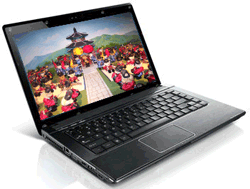
Option 2: Lenovo G460 Core i3-330M Win 7 Home
Proc: Intel Core i3 330M (2.13GHz, 1066MHz, 3MB L2),
RAM 2GB DDR3 SDRAM,
HDD: 320GB HDD,
Display: 14.1" WXGA LED,
Graphics: Intel GMA HD Graphics,
DVD: DVD Super Multi Drive,
Weight: 2.2 kg.
Accessories: Stereo speaker built-in mic, LAN, Bluetooth, 0.3 Mega Pixel webcam, 1 ExpressCard, 3 Usb 2.0, 1 SATA, RJ45, HDMI, VGA, Mic, Headphone, 5 in 1 Multi-Card Reader,
Battery: 6 Cell Li-ion Battery,
OS: Windows 7 Home Basic Licensed.


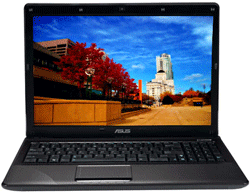
Option 3: Asus K42F-VX020R Win 7 Home Basic
Proc: Intel Core i3 350M 2.26GHz Processor,
Chipset: Intel HM55 Express Chipset,
RAM: 2GB DDR3 Memory,
HDD: 320GB Hard Drive,
Graphics: Intel GMA HD Graphics,
Display: 14.1" HD Wide LED Display,
DVD: Super Multi DVD Dual Layer Drive,
Accessories: WEBCam, wireless b/g/n, 2.2kgs,
OS: Windows 7 Home Basic.

Prices differences are really negligible.

Here is the twist, this laptop should be for my wife alone but I cannot resist the temptation that I can experiment windows 7 on it so Windows Driver Support is really a big thing for me.

So what do you suggest!?
Thanks a lot.